Features
A portrait of your visitors, built with their consent
FollowCustomer answers three questions about the people on your website: who is visiting, where they come from and what they care about. Everything below works in the test phase.
Available now
Who is visiting
Visitors, visits and page views for each website, by hour or by day, compared with the previous period and shown in the website's reporting time zone.
Know at a glance whether more people came this week and when they came.
Where they come from
Every visit gets a channel (social such as Facebook, Zalo and TikTok, search, paid, email, AI assistants, referral, direct), plus the referring website and your utm_source, utm_medium and utm_campaign tags.
See which post, campaign or partner brings people, not just how many clicks there were.
What interests them
The most viewed pages of each website, with addresses cleaned of query strings so one product page is one row.
Learn which products, collections or articles draw attention.
Consent banner with equal choices
The tracker shows a banner with accept, reject and customize buttons of the same size. Nothing is recorded before the visitor chooses.
The portrait only contains people who agreed, per purpose: analytics, identity and marketing.
Consent checked on the server
Every event carries the purpose it needs, and the server checks it against the visitor's current choice. Withdrawing consent stops collection immediately.
A misconfigured page cannot quietly send data the visitor refused.
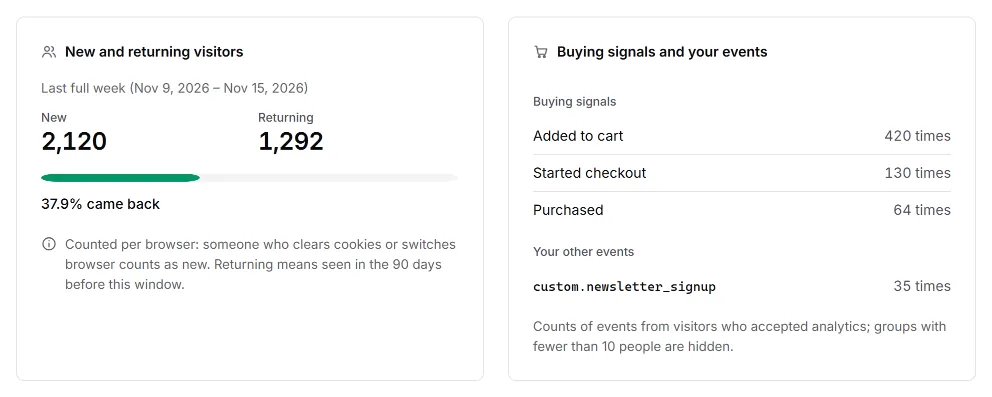
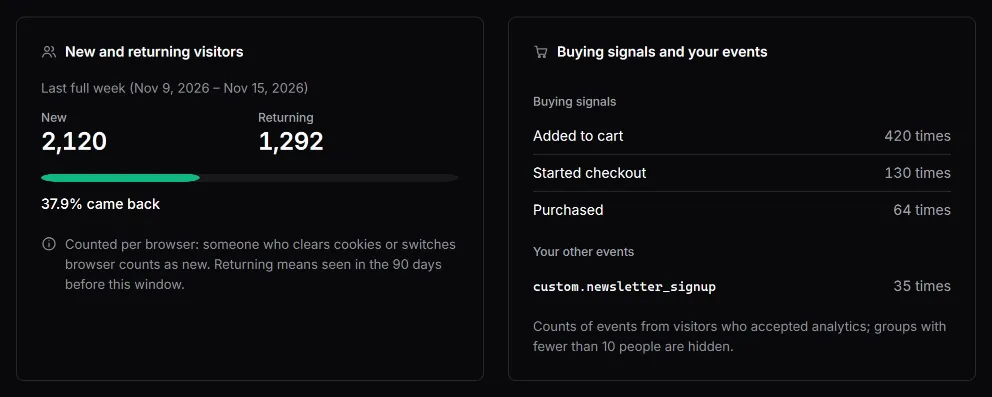
New and returning visitors
Each browser counts once per period; returning means it was seen in the 90 days before the period.
See whether people come back, not just how many arrive.
Buying signals and your own events
Standard events (product_view, add_to_cart, checkout_start, purchase, search, sign_up, login, form_submit) and custom.* events you declare are counted. Names that look like personal data are rejected.
Know how many people add to cart, start checkout and buy.
When they visit
A weekday-by-hour map of the last 28 days in your reporting time zone, with the busiest hour.
Post and advertise when your visitors are actually there.
Devices and languages
Device type, browser, operating system and language, stored as broad groups; the full browser string is never stored.
Know whether to check your shop on a phone first.
People, not bots
Declared crawlers, automated browsers and suspicious traffic are left out of every number and counted apart.
Numbers that look too good are not inflated by bots.
Honest about small numbers
Numbers that would describe fewer than 10 people are hidden, explained and grouped as Other; empty ranges show 0, and every report shows when it was last updated.
The portrait stays useful without ever pointing at one person.
Several websites, one organization
An organization holds several websites, each with its own addresses confirmed by a meta line, a file or a DNS record, a tracking code, consent banner and reports.
See every site of your business from one place, with one team.
Team members and roles
Invite people by email with the Owner, Admin, Analyst or Viewer role.
Each person sees and changes only what their role allows.
Data separated per organization
Every organization's data is isolated in the database, and you choose where it is stored when you create the organization.
One business can never read another business's websites or visitors.
Coming soon
Not available yet. Planned for the next releases.
- Coming soon
Customer profiles
When a visitor signs in on your website, their visits join one profile with a timeline.
- Coming soon
Customer groups
Groups such as returning buyers or people who viewed but did not buy.
- Coming soon
Marketing ideas per group
Suggested actions for each customer group.
- Coming soon
Orders and revenue reports
Reports from the purchase events you already send.
- Coming soon
Webhooks and API
Send events and groups to your own systems.
- Coming soon
AI assistant access (MCP)
Let an AI assistant read the data your organization allows.
See who visits your website
Create an account to add a website and publish its consent banner.